
7 Better AI Tools Than ChatGPT for Students (Free)
Discover 7 free AI tools better than ChatGPT for studying. Improve notes, quizzes, and learning with smarter AI tools for students in 2026.
AI TOOLS FOR STUDENTSSTUDENT TOOLSPRODUCTIVITY TOOLSAI TOOLS BETTER THAN CHATGPT
ANUM SAEED
5/6/20269 min read
INTRODUCTION:
I used ChatGPT to “study” for an entire month… and realized it wasn’t actually helping me learn.
Sounds crazy, right?
At first, it felt like magic. I’d be confused in class, open my phone, ask a question, and suddenly everything made sense. That quick “ohh I get it now” moment made me feel productive.
But when exams came, I hit a problem.
👉 I couldn’t remember anything.
All those explanations? Gone. Because understanding something once is not the same as actually learning it.
That’s where most students go wrong.
ChatGPT is amazing for explanations, but real studying needs more:
notes you can revise
quizzes to test yourself
visuals that make concepts stick
In short, you need a system — not just an answer generator.
So I tested dozens of AI tools to find what actually works for students.
Most were useless. Some were expensive. A few were just copies of ChatGPT.
But I found 7 free AI tools that completely changed how I study.
Compare different AI assistants here:
Claude vs ChatGPT – Which AI is better for studying?
These tools help you:
create notes instantly
generate quizzes
understand topics visually
and actually remember what you learn
And yes — they work perfectly for students in Pakistan.
In this guide, I’ll show you exactly how to use these tools to build a smart AI-powered study system.
If you’re looking for better AI tools than ChatGPT for studying, this guide will show you the best free options in 2026.
Let’s get started.
Why ChatGPT Alone Won't Cut It (Trust Me, I Learned This the Hard Way)
Okay, so before I tell you about the tools that actually helped me survive last semester, let's talk about why ChatGPT—as amazing as it is—just isn't enough when you're seriously trying to study.
Don't get me wrong. ChatGPT is brilliant for certain things. When I need something explained in simple words? ChatGPT. When I have a random question at 2 AM? ChatGPT. When I want to understand why my professor's explanation made zero sense? You guessed it—ChatGPT.
But here's where it falls apart.
Let's say I'm studying for my biology exam. I ask ChatGPT to explain photosynthesis. It gives me this beautiful, detailed explanation with all the steps and processes. I read it, I understand it, I feel good about myself. Great, right?
But then what?
I close the tab. And now all that information is just... gone. There's no quiz to test if I actually understood it. There's no diagram showing me what's happening visually. There's no organized notes I can review the night before my exam. It's just a conversation that happened once and now lives somewhere in my chat history that I'll probably never look at again.
This is why many beginners also struggle with ranking AI content — here’s a full breakdown of Google AI content policy explained (2026 update)
That's the problem with ChatGPT for studying. It explains things really well, but it doesn't help you do the other stuff that actually makes you learn:
Turning your notes into practice questions? Nope. You'd have to manually ask ChatGPT to create questions, then copy-paste them somewhere, then organize them yourself. Too much work when you're already stressed about five different subjects.
Creating visual diagrams or mind maps? ChatGPT can describe what a diagram should look like, but it can't actually draw it for you. And if you're a visual learner like me, reading text descriptions of complex processes is just... not it.
Building a structured revision system? Forget about it. ChatGPT doesn't organize information by topics, create study schedules, or remind you to review things at spaced intervals. It just answers whatever you ask in that moment.
And honestly? When you're preparing for MDCAT, ECAT, or university finals, you need tools that do all of that. You need a complete system, not just an explainer bot.
That's why I started looking for specialized AI tools—ones that are specifically built for the way students actually study. Each tool I'm about to show you is better than ChatGPT at one specific thing. And when you use them together? That's when studying actually gets easier.
Alright, let's get into the good stuff.
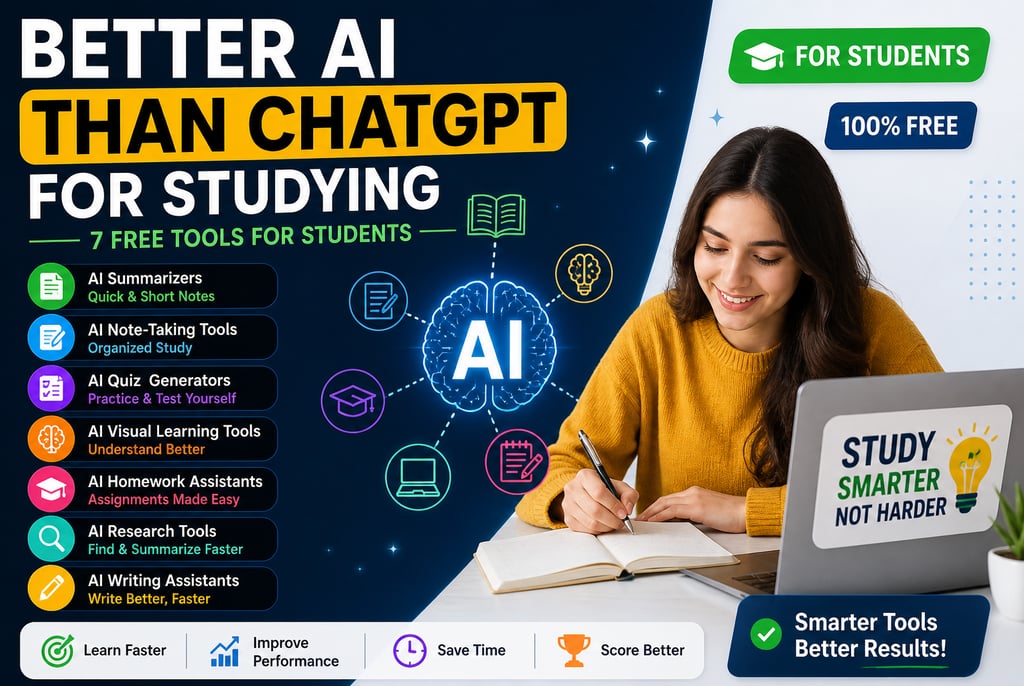
Best AI tools for studying in 2026 are: Notion AI, Quizlet, Resoomer, Whimsical
If you're also interested in creating content with AI, read this:
how to use AI content for SEO without getting penalized
The 7 AI Tools That Actually Helped Me Study (All Free, All Better Than ChatGPT for Specific Tasks)
1. Quillbot + Resoomer: When You Just Need the Short Version
What it's for: Turning massive chapters into short, actually readable notes
So here's a situation that happened to me last month. My professor assigned three research papers to read before our next class. Each paper was like 20-30 pages of dense academic writing. And I had two days.
I tried reading the first one normally. Got through two pages, zoned out, realized I had no idea what I just read. Tried again. Same thing. I was about to give up and just wing it in class when my friend told me about Resoomer.
Basically, you paste the entire paper into Resoomer, hit summarize, and it spits out the key points in like 5-6 bullet points. That's it. No fluff, no unnecessary details—just the main ideas.
If you're just starting, here are the best free AI tools for students in 2026
Why it's better than ChatGPT:
ChatGPT can summarize stuff too, but you have to paste sections at a time (it has character limits), then manually combine all the summaries, then organize them yourself. Resoomer just does it in one shot. Clean bullet points. Done.
I used it for all three papers, got the main concepts in under an hour, and actually contributed to the class discussion the next day. My professor was impressed. I felt like a genius. (I wasn't—I just had the right tool.)
How to use it:
Go to Resoomer.com (free, no signup needed)
Paste your chapter/article/paper
Click "Resoomer"
Copy the summary into your notes
Real talk: Sometimes it misses nuance or important details, so don't rely on it for super technical subjects where every word matters. But for general reading? Life-changing.
ChatGPT is powerful, but not always the best option for every task. If you want a detailed comparison, check this:
Claude vs ChatGPT for Beginners (2026 Guide)
2. Notion AI: The Note-Taking Tool I Wish I'd Found Earlier
What it's for: Organizing your messy study notes automatically
I used to take notes the old-fashioned way. Write stuff down during lectures, end up with 10 different Google Docs with random titles like "bio notes idk" and "THAT THING FROM TUESDAY," lose track of everything, panic before exams.
Then I found Notion AI, and honestly, it changed my entire study routine.
Here's what makes it different. Notion is already a great note-taking app—you can organize notes by subject, create to-do lists, embed videos, whatever. But Notion AI takes it to another level. You can literally highlight messy notes and ask it to "organize this into a structured format" and it'll clean everything up with headings, subheadings, and bullet points automatically.
Why it's better than ChatGPT:
ChatGPT can help you organize text if you ask it to, but then you have to copy-paste everything back into a separate app. With Notion AI, it's all in one place. Your notes live there, the AI cleans them up there, and you can review everything later without switching between tabs.
Personal example:
Last week I was taking notes during an online lecture on Pakistan's economic history. My notes were a mess—random facts, dates, names all jumbled together. I highlighted everything, clicked "Ask AI" → "Organize this by topic," and within seconds it sorted everything into clean sections: Economic Policies, Key Figures, Important Events. Saved me like an hour of manual organizing.
How to use it:
Sign up for Notion (free for students)
Start taking notes in Notion
Highlight text → Click "Ask AI" → Choose what you want (summarize, organize, expand, etc.)
Keep all your subjects organized in one workspace
Pro tip: Create a template for each subject with sections like "Key Concepts," "Formulas," "Practice Questions." Makes reviewing way easier.
3. Quizlet + Kahoot: Turn Your Notes Into Actual Practice Tests
What it's for: Testing yourself so you actually remember stuff
You know what I hate? Spending hours reading notes and then realizing on exam day that I can't actually recall any of it. Reading isn't the same as learning, and I learned that lesson the hard way.
That's where Quizlet changed everything for me.
Quizlet is basically a quiz generator. You can type in your notes, and it'll automatically create flashcards, practice tests, and matching games. Or—and this is the game-changer—you can upload your notes as a document and Quizlet AI will generate the quiz questions for you.
Why it's better than ChatGPT:
Sure, you could ask ChatGPT "create quiz questions from these notes," and it would. But then you'd have to copy-paste those questions somewhere, create your own quiz format, and manually track which ones you got right or wrong. Quizlet does all of that automatically. Plus, it uses spaced repetition—meaning it shows you the questions you keep getting wrong more often until you actually learn them.
Real example:
Before my chemistry midterm, I had like 40 pages of notes on chemical bonding, reactions, equations—the whole nightmare. I uploaded them to Quizlet, and it generated 50 flashcards and a practice test in literally 2 minutes. I spent the next week doing those flashcards during bus rides, before bed, whenever I had 5 free minutes. By exam day, I knew the material cold.
How to use it:
Sign up for Quizlet (free version works fine)
Upload your notes or type in key concepts
Let Quizlet AI generate flashcards
Practice daily—even just 10 minutes helps
Bonus: If you want something more interactive for group study, try Kahoot. It's like Quizlet but in game format, which is perfect if you're studying with friends and need to make it less boring.
4. Whimsical + Mindmeister: For When You Need to Actually SEE the Concept
What it's for: Creating diagrams and mind maps that make complex topics click
I'm a visual learner. Always have been. So when professors explain things verbally or just write text on slides, my brain just... doesn't retain it. I need to see how things connect.
ChatGPT can describe a process in words, but it can't draw it for me. That's where tools like Whimsical and Mindmeister come in.
These tools let you create mind maps, flowcharts, and diagrams super easily. And the AI features help you organize ideas visually without having to manually drag boxes around for an hour.
Why it's better than ChatGPT:
ChatGPT can tell you "photosynthesis has two stages: light-dependent reactions and light-independent reactions." Cool. But Whimsical can show you a flowchart with arrows, boxes, and color-coding that makes the entire process visual and way easier to remember.
f you want a detailed comparison of AI assistants, read:
Claude vs ChatGPT for Students (2026 Comparison Guide)
When I use it:
Anytime I'm studying something with multiple steps or connections—biology processes, historical timelines, business workflows, programming logic. I'll open Whimsical, dump all the concepts into boxes, and let the AI suggest how to connect them. Suddenly everything makes sense.
How to use it:
Sign up for Whimsical or Mindmeister (both have free plans)
Create a new mind map
Add your main topic in the center
Add branches for subtopics
Use colors and icons to make it memorable
Pro tip: Take a screenshot of your final mind map and save it to your phone. Review it whenever you're waiting for class to start or commuting. Visual review is way more effective than rereading text notes.
FAQs (Optimized for Ranking)
❓ Is there better AI than ChatGPT for studying?
Yes. While ChatGPT is great for explanations, specialized AI tools are better for tasks like creating quizzes, organizing notes, and visual learning. Using multiple tools together gives better study results.
❓ Are these AI tools free?
Most AI tools offer free versions that are enough for students. Some have paid upgrades, but you can study effectively using free features only.
❓ Can I study without skills using AI?
Yes, AI tools make studying easier, but they don’t replace effort. You still need to practice, revise, and stay consistent to see real improvement.
❓ Is There a Better AI Than ChatGPT for Studying?
Yes—depending on what you need.
ChatGPT is excellent for explaining concepts in simple language, but it’s not the only option. Some specialized AI tools are better for:
creating quizzes and practice tests
organizing study notes
visual learning and diagrams
active recall and revision
👉 The best results come when you combine multiple AI study tools instead of relying on just one.
❓ Are AI Study Tools Free for Students?
Yes, most AI tools offer free versions that are enough for students.
Free plans usually include:
basic Q&A help
note generation
simple quizzes
summaries of topics
💡 Paid versions exist, but they are optional. Most students can study effectively using free tools only.
❓ Can I Study Effectively Using AI Without Any Skills?
Yes, AI makes studying easier even for beginners.
However, AI is a support tool, not a shortcut. You still need:
regular practice
revision of topics
consistency in learning
👉 AI helps you understand faster, but your effort builds real knowledge.
❓ Can AI Help Me Prepare for Exams Faster?
Yes, AI can significantly improve exam preparation by:
generating practice questions
explaining difficult topics in simple words
helping you revise faster
identifying weak areas
❓ Will AI Make Students Lazy in Studies?
Not if used correctly.
👉 Wrong use: copying answers without learning
👉 Smart use: understanding + practicing + revising
Used properly, AI actually improves productivity and learning speed
Conclusion
ChatGPT is a really helpful tool for studying, but honestly, it’s not enough on its own if you want to fully learn something.
To actually improve how you study, you need tools that help you in different ways—like:
organizing and taking better notes
checking what you’ve really understood
seeing concepts in a visual way so they make sense faster
That’s where other AI tools can really help.
👉 When you use the right mix of tools, studying becomes easier. You can:
learn things faster
remember them for longer
prepare better for exams without last-minute stress
⚡ Final Tip
Don’t overload yourself with too many tools at once. Start with just one, get comfortable with it, and then slowly build your own study system that actually works for you.
About the Author
Anum Saeed is a digital content creator and AI enthusiast who focuses on helping students and beginners use technology to learn smarter and faster. She writes about AI tools, online learning strategies, and SEO-friendly content creation for modern learners, especially in Pakistan.
Her goal is to simplify complex topics and show students how to use AI tools effectively for studying, productivity, and skill development.
Contact
Subscribe our Newsletter
© 2026. All rights reserved.
about anumtechno
AnumTechno is a modern digital platform focused on AI, SEO, and content creation insights. The website helps creators, bloggers, and marketers learn how to use artificial intelligence to write better content, improve search rankings, and grow online traffic effectively. It shares practical guides, tutorials, and strategies designed to simplify complex SEO and AI concepts for beginners and professionals alike.