
Best Free Keyword Research Tools for US SEO 2026
The best free keyword research tools for US SEO traffic in 2026. Find low-competition keywords with Google Keyword Planner, Trends, and more.
KEYWORD RESEARCHSEO TOOLSBLOGGINGAI TOOLS
Introduction
If you are a blogger in Pakistan trying to rank for US traffic, here is something nobody tells you upfront — the keyword tool you use matters more than the article you write.
You can produce the most detailed, well-written content on the internet. But if you target the wrong keywords, Google will never show it to the right people. Your article stays invisible while weaker content from lower-quality websites ranks on page one.
This happened to me when I first started AnumTechno. I wrote articles I was genuinely proud of and got zero traffic for months. The problem was not the writing. It was that I had no idea how to find keywords that were actually winnable.
Here is what I learned after testing dozens of tools: you do not need expensive SEO software to find profitable keywords for US traffic. The best free tools in 2026 are more than enough to build a real content strategy that ranks.
Quick Answer — Best Free Keyword Research Tools for US Traffic:
Best overall tool → Google Keyword Planner
Best beginner tool → Ubersuggest
Best trend tool → Google Trends
Best free extension → Keyword Surfer
Best for questions → AnswerThePublic
Best competitor research → Semrush Free Plan
Best long-tail ideas → Soovle
Best keyword difficulty → Moz Keyword Explorer
Best hidden opportunity → Bing Webmaster Tools
Best CPC data → Keywords Everywhere
Why US Traffic is Worth Targeting in 2026
The answer comes down to money.
US advertisers pay significantly higher rates for clicks on Google Ads. This means every visitor from the United States is worth considerably more in advertising revenue than a visitor from most other countries.
A blog earning PKR 5,000 per month from Pakistani traffic could potentially earn PKR 40,000 to 80,000 per month from the same volume of US traffic — simply because CPC rates are that much higher.
For affiliate marketers the difference is even more dramatic. US readers have stronger purchasing power and higher conversion rates on affiliate products.
If you are new to blogging, read my complete guide on how to start a blog in Pakistan and make money in 2026 before diving into keyword research.
Why Keyword Research Matters More Than Ever in 2026
AI Content Changed Everything
Thousands of AI-generated articles are published every single day. Google has become much better at identifying and rewarding genuinely helpful, well-researched content over generic AI output.
Search Intent Matters More Than Keywords
In 2026, matching your content to what the searcher actually wants is more important than simply including keywords. A perfectly optimized article targeting the wrong intent will never rank.
Long-Tail Keywords Are Easier to Win
Specific three to five word keyword phrases have lower competition, clearer search intent, and faster ranking potential for new websites than broad competitive terms.
Google Rewards Helpful Content
Depth, originality, and genuine expertise are the ranking factors that matter most in 2026. Surface-level content no longer competes regardless of how well it is optimized.
My Personal Daily Workflow: Step 1 → Google Trends to find rising US topics Step 2 → Google Keyword Planner filtered to United States for volume Step 3 → AnswerThePublic for question keywords and FAQ ideas Step 4 → Manual SERP check to assess real competition Step 5 → Semrush free plan to analyze competitor domains
This entire process takes about 20 minutes per article and has driven consistent organic growth for AnumTechno.
What Makes a Good Free Keyword Research Tool?
A genuinely useful tool should help you:
Discover keyword ideas quickly
Estimate search volume and competition
Understand search intent behind each keyword
Identify long-tail opportunities with lower competition
Analyze what is already ranking so you know whether you can compete
Full Comparison Table — Best Free Keyword Research Tools for US Traffic 2026
My Free Keyword Research Workflow for US Traffic (Step by Step)
Most beginners jump straight into writing without a clear research process. That is the biggest mistake you can make when targeting US traffic.
Here is the exact workflow I use for every article on AnumTechno — tested, refined, and producing consistent results:
My 5-Step Free Keyword Research Workflow:
Step 1 → Find a rising trend with Google Trends Step 2 → Validate search volume in Google Keyword Planner Step 3 → Extract real questions using AnswerThePublic Step 4 → Check competitor strength in Semrush free plan Step 5 → Write content around low-competition long-tail phrases
Step 1 — Find a Rising Trend With Google Trends
Before touching any keyword tool, I open Google Trends and set the location to United States.
I look for topics showing consistent upward movement over the past 6 to 12 months — not viral spikes that disappear in a week, but steady growth that signals long-term search demand.
This single step has helped me discover keyword opportunities months before they became competitive.
What to look for:
Consistent upward trend over 6 to 12 months
Related queries showing breakout growth
Seasonal patterns you can plan content around
Step 2 — Validate Search Volume in Google Keyword Planner
Once I have a trending topic, I open Google Keyword Planner and set the location filter specifically to United States.
I enter my seed keyword and look through the suggestions for long-tail variations with low competition scores. I ignore broad high-volume keywords entirely at this stage — those are for established sites with high domain authority.
What I look for:
Long-tail keywords with 3 or more words
Low competition rating
CPC above $1 — indicates commercial value
Monthly searches between 100 and 2,000 for new sites
Step 3 — Extract Real Questions Using AnswerThePublic
Now I know my keyword. Next I need to understand exactly what questions US readers are asking around that topic.
I paste my keyword into AnswerThePublic and export the full question list. These questions become my H2 and H3 subheadings, my FAQ section, and my featured snippet targets.
This step alone can dramatically improve how Google understands and ranks your content.
What I collect:
Who, what, when, where, why, how questions
Comparison queries — X vs Y
Preposition phrases — X for, X without, X with
Step 4 — Check Competitor Strength in Semrush
Before writing a single word I check who is currently ranking for my target keyword.
I open Semrush free plan, search my keyword, and look at the domain authority of the top 10 results. If positions 4 to 8 contain sites with authority scores below 30 — I have a realistic shot at ranking.
If every position is held by Forbes, HubSpot, or Semrush itself — I go back to Step 1 and find a more specific angle.
Green light signals:
Competitor domain authority under 30
Articles older than 2023 with no updates
Forum posts or Reddit threads ranking on page one
Thin content under 1,000 words currently ranking
Step 5 — Write Content Around Low-Competition Phrases
Now I write. But not just around the main keyword — I build the entire article around a cluster of low-competition long-tail phrases I discovered in Steps 1 to 4.
Each subheading targets a specific long-tail variation. The FAQ section targets question keywords from AnswerThePublic. The conclusion naturally includes semantic variations.
This approach means one article can rank for 10 to 20 related keyword phrases — not just one.
Time This Workflow Takes: Google Trends — 5 minutes Keyword Planner — 8 minutes AnswerThePublic — 4 minutes Semrush check — 5 minutes Total research time — under 25 minutes per article
The 10 Best Free Keyword Research Tools for US Traffic in 2026
1. Google Keyword Planner — Best Overall Free Tool
Google Keyword Planner remains the single most reliable free keyword research tool in 2026 because data comes directly from Google itself.
Why It Works for US Traffic
You can filter results specifically by United States location and English language — giving you search volume data for American searchers rather than global averages that can mislead your entire strategy.
How to Use It Step by Step
Open Google Ads and navigate to Tools → Keyword Planner
Click Discover New Keywords
Enter your topic or seed keyword
Set location to United States, language to English
Filter by low competition and look for long-tail opportunities
Export your keyword list and sort by CPC to find high-value terms
Pros:
Free with any Google account
Data comes directly from Google — most reliable source available
Country and language filtering for precise US targeting
CPC data identifies high-value commercial keywords
Keyword grouping helps organize content clusters
Cons:
Requires a Google Ads account
Shows volume ranges rather than exact numbers without active campaign
Interface can feel overwhelming for complete beginners
Best For: Every blogger targeting US traffic — this should be your first tool
Website: ads.google.com/home/tools/keyword-planner
2. Google Trends — Best Tool for Trending US Topics
Why Most Bloggers Underestimate This Tool
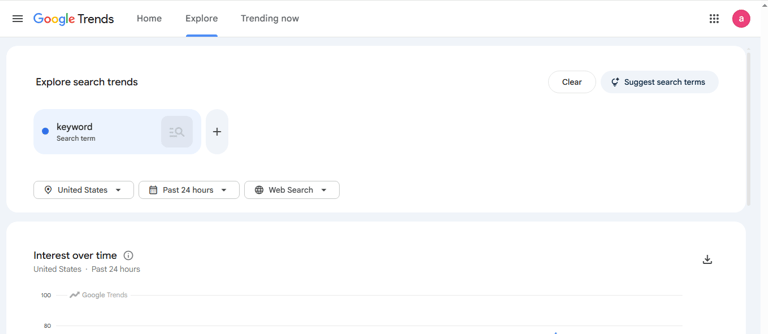
While other tools tell you how popular a keyword is right now, Google Trends shows you where it is heading. For US traffic targeting, this is a major competitive advantage.
The Early Mover Advantage
If you publish a well-optimized article on a rising topic two to three months before competitors notice it, you establish a ranking position that is very difficult to displace later.
I found one of AnumTechno's best-performing keywords through Google Trends by noticing a consistent upward search trend three months before the topic became widely covered.
How to Use It for US Traffic
Go to trends.google.com
Search your topic
Set geographic filter to United States
Check past 12 months view for seasonal patterns
Look at Related Queries for additional keyword ideas
Pros:
Completely free with no account required
Real-time trend data updated daily
US-specific filtering for precise audience targeting
Seasonal pattern identification for content planning
Related queries generate additional keyword ideas
Cons:
Does not show exact search volume numbers
Works best combined with a volume tool like Keyword Planner
Trending topics can sometimes become competitive quickly
Best For: Finding rising US topics before competitors discover them
Website: trends.google.com
3. Ubersuggest — Best Beginner SEO Tool
Why Beginners Love It
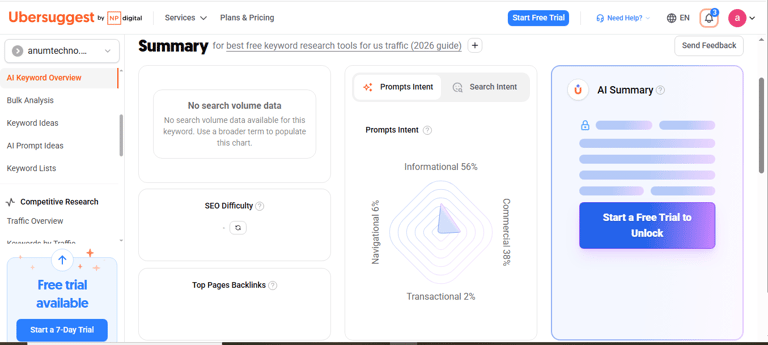
Ubersuggest was built specifically to make keyword research accessible for people who are not SEO experts. It explains what the data means rather than just showing numbers.
What the Free Version Gives You
Keyword suggestions with SEO difficulty scores
Monthly search volume estimates
Content ideas based on what is already ranking
Basic competitor domain analysis
Traffic estimates for top-ranking pages
Important Warning
Never rely on difficulty scores alone. Always manually check the actual Google search results for any keyword before targeting it. Sometimes keywords with medium difficulty scores have surprisingly weak results pages that you can realistically compete with.
Pros:
Beginner-friendly interface that explains data clearly
Competitor breakdown shows why keywords are difficult
Content ideas section shows what is already ranking
Free daily searches sufficient for regular research
Cons:
Free version limits to 3 daily searches
Data can sometimes differ significantly from Google Keyword Planner
Advanced features require paid subscription
Best For: Beginners who want keyword research, competitor analysis, and content ideas in one simple tool
Website: neilpatel.com/ubersuggest
4. AnswerThePublic — Best for Question Keywords
Why Question Keywords Win in 2026
Modern Google search is heavily oriented toward conversational, question-based queries. When someone in America searches for information, they increasingly type full questions rather than short keyword phrases.
Question-based keywords are typically much easier to rank for than broad competitive terms, and they often convert better because the searcher's intent is very specific.
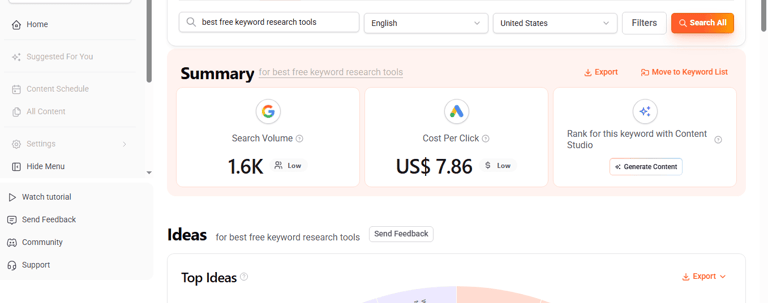
What It Shows You
Questions people ask on Google
Comparisons between topics
Preposition-based searches
Related long-tail variations
Best Use Cases
Building FAQ sections that capture Google featured snippets
Creating blog subheadings that match real search queries
Identifying content gaps competitors have missed
Pros:
Reveals real questions people ask on Google
Visual keyword map makes content planning intuitive
Excellent for FAQ sections and featured snippet targeting
Free searches available daily without account
Cons:
Limited to 3 free searches daily
Does not show search volume data
Works best combined with a volume tool
Best For: Bloggers building FAQ sections and targeting question-based keywords
Website: answerthepublic.com
5. Keyword Surfer — Best Free Chrome Extension
How It Works
Keyword Surfer displays keyword data directly inside your Google search results as you browse. No switching tabs, no copying and pasting keywords into another platform.
You search something on Google and Keyword Surfer instantly shows monthly search volume, related keywords, content length estimates for top-ranking pages, and CPC data — all in a sidebar right next to the results.
Why It Saves Time Every Day
For bloggers who research keywords while browsing, this tool saves significant time every single day. It is also completely free with no daily search limits.
Pros:
Completely free with no usage limits
Works inside Google search — zero extra steps
Shows search volume and related keywords instantly
CPC data identifies high-value commercial keywords
One-click Chrome installation
Cons:
Chrome browser only
Data accuracy varies vs Google Keyword Planner
Cannot export keyword lists directly
Best For: Bloggers who want quick keyword data while browsing without switching tools
Website: surferseo.com/keyword-surfer-extension
6. Soovle — Best for Long-Tail Keyword Brainstorming
Multi-Platform Keyword Discovery
Soovle collects autocomplete suggestions from Google, Bing, YouTube, Amazon, Wikipedia, and others simultaneously on one screen.
Why Amazon Suggestions Matter for US Traffic
Amazon autocomplete suggestions reveal commercial keywords with high US buying intent that translate exceptionally well to affiliate content. These keywords are often completely missed by tools that only look at Google.
Pros:
Completely free with no account required
Shows suggestions from multiple platforms simultaneously
Amazon suggestions reveal high-intent commercial keywords
Fast and simple with no learning curve
Cons:
No search volume data
No competition or difficulty metrics
Best used as a brainstorming starting point
Best For: Initial keyword brainstorming and discovering long-tail variations across multiple platforms
Website: soovle.com
7. Bing Webmaster Tools — The Hidden US Traffic Opportunity
Why Most Bloggers Ignore Bing (And Why That Is Your Advantage)
Bing has a significant share of US search traffic — particularly among older American demographics, corporate Windows users, and Microsoft Edge browsers. Because most bloggers focus exclusively on Google, competition on Bing for many keywords is dramatically lower.
Some websites rank on page one of Bing for keywords where they sit on page three or four of Google — simply because fewer people optimize for Bing.
What You Get for Free
Keyword performance data
Crawl and indexing reports
Site optimization recommendations
SEO insights unique to Bing's algorithm
Pros:
Completely free with Microsoft account
Lower competition for many US keywords
US demographic on Bing has higher average purchasing power
Crawl tools identify technical SEO issues
Cons:
Smaller search volume than Google
Interface less intuitive than Google Search Console
Keyword data less comprehensive than Google tools
Best For: Bloggers who want an additional US traffic source with less competition
Website: bing.com/webmasters
8. Moz Keyword Explorer — Best for Keyword Difficulty Analysis
The Priority Score Advantage
Moz's Priority Score combines volume, difficulty, and click-through rate into a single actionable metric. When you are deciding between multiple keyword options, this single number tells you which one offers the best realistic ranking opportunity.
How to Use Your Free Searches Wisely
With only 10 free daily searches, use Moz specifically for final keyword decisions rather than broad research. Run your top two or three keyword candidates through Moz to determine which one to target.
Pros:
Highly accurate keyword difficulty scoring
Priority Score simplifies complex decisions
Organic CTR data predicts actual traffic potential
SERP analysis shows exactly who you compete against
Cons:
Very limited daily free searches
Full value requires paid Moz Pro subscription
Interface can be slow
Best For: Making final keyword decisions when choosing between multiple options
Website: moz.com/explorer
9. Semrush Free Plan — Best for Competitor Keyword Research
The Competitor Advantage
For targeting US traffic specifically, Semrush's competitor analysis is invaluable. You can enter any competitor URL and see exactly which US keywords are driving their traffic — then target those same keywords with better, more current content.
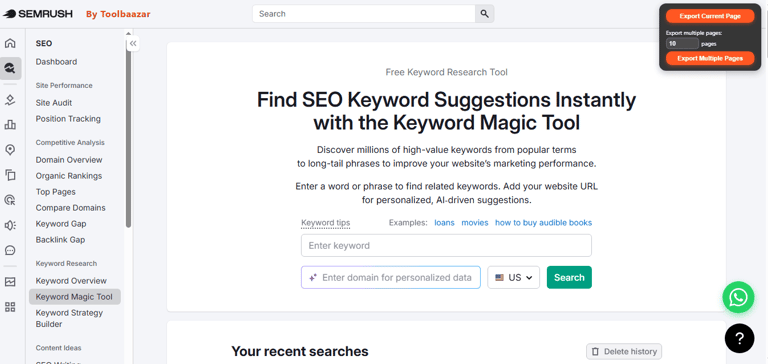
What the Free Plan Gives You
10 keyword research searches daily
Competitor keyword analysis
Domain traffic overview
Keyword difficulty and volume data
Basic position tracking
Pros:
Competitor keyword analysis powerful even on free plan
Shows exactly which keywords competitors rank for in US
Keyword difficulty and volume data highly accurate
Domain analytics identify traffic opportunities
Cons:
Strict daily limits on free plan
Can overwhelm complete beginners
Full competitor analysis requires paid subscription
Best For: Bloggers who want to reverse-engineer competitor keyword strategies for US traffic
Website: semrush.com
10. Keywords Everywhere — Best for US CPC Data
Why CPC Data Matters
For US traffic targeting, CPC data immediately tells you which keywords American advertisers are paying the most for — a strong indicator of commercial intent and earning potential for your blog.
Multi-Platform Coverage
Keywords Everywhere works across Google, YouTube, Amazon, and other platforms — giving you CPC and trend data wherever you research.
Pros:
Works across multiple platforms including YouTube and Amazon
CPC data instantly identifies high-value commercial keywords
Trend graphs show keyword popularity over time
Available for Chrome and Firefox
Cons:
Full volume data requires paid credits
Free version more limited than some alternatives
Data occasionally differs from Google Keyword Planner
Best For: Bloggers who want quick CPC and trend data across multiple platforms
Website: keywordseverywhere.com
How to Find Easy Keywords for US Traffic — My Personal Step by Step Strategy
Most beginners target the biggest keywords in their niche, see extremely high difficulty scores, and give up. The real opportunity is always in specific targeted long-tail keywords where competition is genuinely weak.
Here is the exact workflow I use for AnumTechno:
Step 1 — Find a Rising Topic Open Google Trends, set location to United States, look for topics showing consistent upward search interest over the past 6 to 12 months.
Step 2 — Generate Keyword Ideas Enter your topic into Google Keyword Planner with location set to United States. Look specifically for long-tail keywords with low competition scores.
Step 3 — Find Real Questions Run the same topic through AnswerThePublic to find specific questions American searchers are asking. These become your subheadings and FAQ section.
Step 4 — Check Competition Manually Search your target keyword directly on Google. If you see forum posts, Reddit threads, old articles from 2022 or 2023, or low-authority websites — you have a realistic ranking opportunity.
Step 5 — Analyze Competitors With Semrush Check the domain authority of sites currently ranking. If positions 4 to 8 contain sites with domain authority under 30, you can compete.
Step 6 — Write Better Content Create content that is more detailed, more current, more helpful, and better structured than what currently ranks. Add personal experience, real examples, and genuine opinions.
You can also read my guide on how to use AI content for SEO without getting penalized by Google for tips on writing content that ranks safely in 2026.
Common Keyword Research Mistakes to Avoid
Targeting High Competition Keywords Too Early
New websites rarely rank for extremely competitive keywords. Focus on long-tail, low competition terms until your domain authority grows.
Ignoring Search Intent
A keyword might have strong volume but completely wrong intent for your content. Always match your article type to what the searcher actually wants.
Using Only One Tool
No single free tool gives you the complete picture. Combine Google Keyword Planner for volume, Google Trends for trajectory, AnswerThePublic for questions, and manual SERP checking for realistic competition assessment.
Publishing Thin Content
Google in 2026 heavily rewards depth, originality, and genuine expertise. A comprehensive 2,500 word article with real personal experience will consistently outperform a 700 word article that summarizes information available elsewhere.
For more on this topic read my guide on Google AI Content Policy explained 2026.
Frequently Asked Questions
Which free keyword research tool is best for US traffic in 2026? Google Keyword Planner is the most reliable starting point because data comes directly from Google with precise US location filtering. Use it alongside Semrush free plan for competitor analysis and AnswerThePublic for question keywords. These three tools together cover everything a beginner needs to build a complete US traffic keyword strategy.
Can I rank for US traffic using only free SEO tools? Yes. Many successful blogs built entirely on free tools rank for competitive US keywords. The tools are not the limiting factor — content quality and keyword selection are. Free tools like Google Keyword Planner and Semrush give you enough data to make smart decisions without spending money.
What keywords are easiest to rank for as a new website? Long-tail keywords with three or more words, low competition scores, and informational search intent are generally most accessible for new websites. Look for keywords where weak or outdated content currently ranks on page one — that is your real opportunity.
Is US traffic really worth targeting for Pakistani bloggers? Absolutely. US CPC rates are consistently 5 to 15 times higher than Pakistani rates for most niches. A blog with moderate US traffic can earn significantly more than the same blog with high local traffic purely because of the advertising revenue difference.
How many free searches do I get on these tools per day? Google Keyword Planner and Google Trends are unlimited. Ubersuggest gives 3 free searches daily. AnswerThePublic allows 3 free searches. Moz gives 10 free queries daily. Semrush allows 10 free searches daily. Keyword Surfer is completely unlimited as a Chrome extension.
Should I use all 10 tools or just pick a few? Start with Google Keyword Planner and Keyword Surfer as your daily tools. Add AnswerThePublic for FAQ research and Semrush for competitor analysis. Build your workflow around 3 to 4 tools that suit your research style rather than trying to use all 10 simultaneously.
Conclusion
You do not need to spend money on premium SEO tools to build a content strategy that ranks for US traffic in 2026.
The 10 free tools in this guide give you everything you need — search volume data, competitor analysis, question keywords, trend tracking, CPC insights, and long-tail keyword discovery — without spending a single dollar.
The difference between bloggers who rank and those who do not is rarely the tools. It is the strategy behind the research. Find winnable long-tail keywords, understand search intent, create content that genuinely helps the reader, and build internal links between related articles.
Do that consistently and US traffic will follow.
Bookmark this guide and share it with a fellow blogger who is still guessing which keywords to target. The right research makes everything else easier.
Published on AnumTechno.com | SEO & Keyword Research | Serving Bloggers Worldwide