
Can ChatGPT Analyze Videos? (Free Method That Works)
Can ChatGPT analyze videos? Not directly — but here's the free transcript trick to summarize any lecture or YouTube video in minutes.
ANUM SAEED
5/31/20266 min read
Can ChatGPT Analyze Videos? Here's the Honest Truth (2026)
So you've got a video — a 2-hour lecture, a YouTube tutorial, a class recording you slept through — and you're wondering if ChatGPT can just watch it and tell you what's inside.
I wondered the same thing. I dragged an MP4 into ChatGPT, hit send, and waited for a neat little summary to appear.
It didn't. At least not the way I expected.
So let me save you that confusion. Here's what actually works in 2026, plus the free trick I use almost every week to get ChatGPT to "understand" my videos anyway.
Quick answer: ChatGPT can't directly watch or stream a video, and it can't open a YouTube link. Newer models can sometimes read a short uploaded clip, but it's inconsistent. The reliable, free way to analyze any video is to give ChatGPT the transcript (the spoken words) plus a screenshot of anything visual. Do that, and it can summarize, make notes, and answer questions as if it watched the whole thing.
Table of contents
Short answer: can ChatGPT analyze videos?
Not directly — at least not reliably. ChatGPT usually can't sit and watch a video the way a person does. Paste a YouTube link and it won't open it. Upload a long video file and in most cases it won't process the whole thing. Some of the newer models can take a short clip and read a few frames, but it's hit or miss depending on your plan and app.
Practically, though, yes — you can absolutely make it work. ChatGPT can analyze the transcript (the spoken words) and screenshots (the visuals) from your video. Hand it those, and it responds like it watched the entire thing.
That single distinction is the whole secret. Let me walk you through it.
Why ChatGPT can't fully "watch" a video
The simple reason: ChatGPT is built for text first.
A video is a heavy thing under the hood — thousands of images stacked together with an audio track running underneath. The everyday ChatGPT most of us use isn't designed to swallow all of that and follow it moment by moment like a human eye does.
Some newer models can take a short clip and read a few frames plus the audio. But honestly, it's unreliable. Half the time the upload option isn't even there for you, because it depends on your plan, your region, and which app you're using. So I stopped relying on it.
What ChatGPT CAN do with your video
Don't get discouraged. ChatGPT is still genuinely useful here — you just have to hand it the video the right way.
Think of a mango. ChatGPT can't eat the whole thing with the peel on. But peel it, cut it into pieces, and it'll happily finish the plate.
Once you give it the words and the key visuals, it can:New to ChatGPT entirely? My guide on how to use ChatGPT in Pakistan for free walks you through the basics first.
Summarize a long lecture into short, clean notes
Pull out the main points of a tutorial
Turn an English video into easy Urdu notes (or the other way around)
Make exam questions and MCQs from a class recording
Write a blog post or script based on the content
The trick is simple: don't give it the video. Give it the words.
The free method I use (step by step)
This is my exact workflow, and it costs nothing.
Step 1 — Grab the transcript
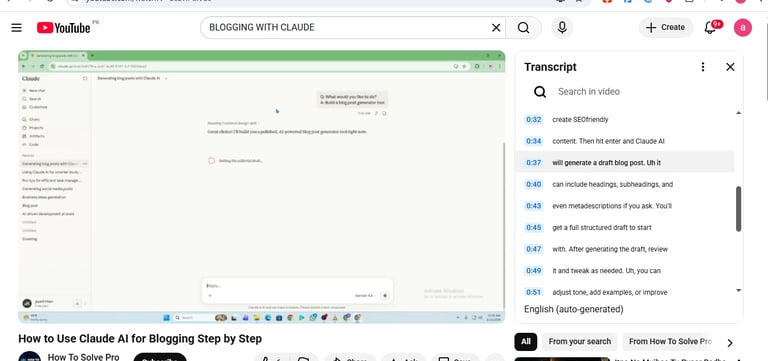
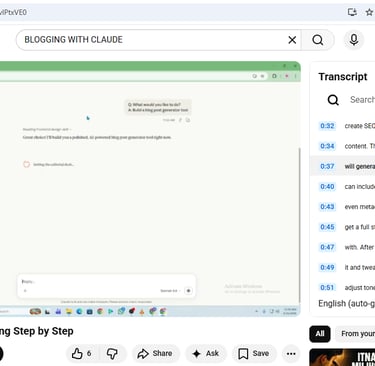
For a YouTube video, this is the easy part. Open the video, click the three dots (or the "Show transcript" option below it), and YouTube hands you the full text of everything said. Select it and copy it.
If it's your own recording with no transcript, run the audio through a free voice-to-text tool first, then copy that text.
Step 2 — Paste it into ChatGPT with a clear instruction
Don't just dump the text and say "summarize." Tell it exactly what you want:
"Here's the transcript of a 40-minute lecture. Give me short, simple notes in plain English with the main points and key definitions."
Step 3 — Ask follow-up questions
Now it behaves like it watched the whole thing. You can ask:
"Make 10 MCQs from this for my exam"
"Explain the difficult parts like I'm 15"
"What did the speaker say about [topic]?"
Two minutes of effort, and a 40-minute video becomes a study sheet.
The screenshot trick for diagrams and slides
Sometimes the words aren't enough. There's a chart, a diagram, or a slide on screen that actually matters.
Easy fix: pause the video, take a screenshot, and upload that image to ChatGPT. It reads images really well now. Ask, "Explain this diagram from my lecture," and it will.
Transcript for the talking, screenshots for the visuals. Between the two, you've covered almost everything you'll ever need from a video.
How students can actually use this
This is where it pays off most.
Long recorded class? Transcript in, revision notes out. Stuck on an English-medium lecture? Paste the transcript and ask for the notes in Urdu — suddenly a hard topic is in your own language. Exam coming up? Ask for practice MCQs straight from the lecture.
I've turned whole playlists into revision sheets this way during exam weeks.It's the closest thing to having someone watch the boring videos for you. If you want more of these, check out my picks for AI study tools that are better than ChatGPT and these free AI websites every Pakistani student should know about.
Why your video upload might have failed
If you tried uploading a video and it didn't work, it's usually not your fault:
The attachment button isn't enabled for your plan or region
The file was too big or too long
The model in that chat doesn't support video input
Don't waste time fighting it. Switch to the transcript method — it's more reliable anyway, and free.
ChatGPT vs Gemini for video: which should you use?
If video is a big part of your work, I'll be straight with you: Google's Gemini currently handles longer videos more directly than ChatGPT does. But for everyday summarizing, ChatGPT plus the transcript trick is more than enough — and free.If you're still deciding which AI tool to use day to day, my honest Claude vs ChatGPT comparison for beginners breaks down the strengths of each.
Here's a quick comparison so you can decide:
For most students and beginners, ChatGPT with transcripts wins on simplicity and cost. Reach for Gemini only when video is the main thing you're doing.
Key takeaways
ChatGPT usually can't watch or stream a video directly, and it can't open YouTube links. Short clips sometimes work, but not reliably.
It can analyze the transcript and screenshots from any video — that's the real method.
The free workflow: copy the transcript, paste it into ChatGPT, ask for notes or a summary.
Use screenshots for diagrams and slides the transcript can't capture.
For heavy video work, Gemini handles longer videos more directly; for study and everyday use, ChatGPT is enough.
Frequently asked questions
Can ChatGPT watch YouTube videos from a link? Not from the link itself — it can't open it. Copy the video's transcript and paste that instead, and it can summarize and analyze the whole thing.
Can ChatGPT summarize YouTube videos? Yes, through the transcript. Paste the transcript and ask for a summary or notes. It works very well.
Can ChatGPT analyze a video I upload? Sometimes, for short clips, depending on your plan and app. It's inconsistent, so the transcript method is more reliable and free.
Is there a daily limit? The free version has usage limits that reset over time. For a very long transcript, paste it in two or three parts.
Can it translate a video into Urdu or English? Yes. Give it the transcript and ask. Turning English tutorials into Urdu revision notes is one of my favourite uses.
Should I use ChatGPT or Gemini for video? Gemini for heavy or frequent video work; ChatGPT with transcripts for students and everyday summaries.
Final thoughts
Can ChatGPT analyze videos? Directly, no. Practically, yes — every time — once you feed it the transcript and a screenshot or two.
The "it can't watch videos" thing sounds like bad news at first. But once the transcript trick becomes a habit, you'll realize you never needed it to watch anything. You just needed the information out of the video, fast and in plain words — and that's exactly what ChatGPT is best at.
Try it on your next lecture. Copy the transcript, paste it, ask for easy notes. You'll thank yourself later.
Contact
Subscribe our Newsletter
© 2026. All rights reserved.
about anumtechno
AnumTechno is a modern digital platform focused on AI, SEO, and content creation insights. The website helps creators, bloggers, and marketers learn how to use artificial intelligence to write better content, improve search rankings, and grow online traffic effectively. It shares practical guides, tutorials, and strategies designed to simplify complex SEO and AI concepts for beginners and professionals alike.