
Can Canvas Detect ChatGPT? Honest 2026 Answer
Can Canvas detect ChatGPT? Not on its own. Here is what Canvas can actually see, what really scans your work, and what to do if you are wrongly flagged.
SEO & BLOGGING
ANUM SAEED
7/14/20268 min read
Can Canvas Detect ChatGPT? (Honest 2026 Answer)
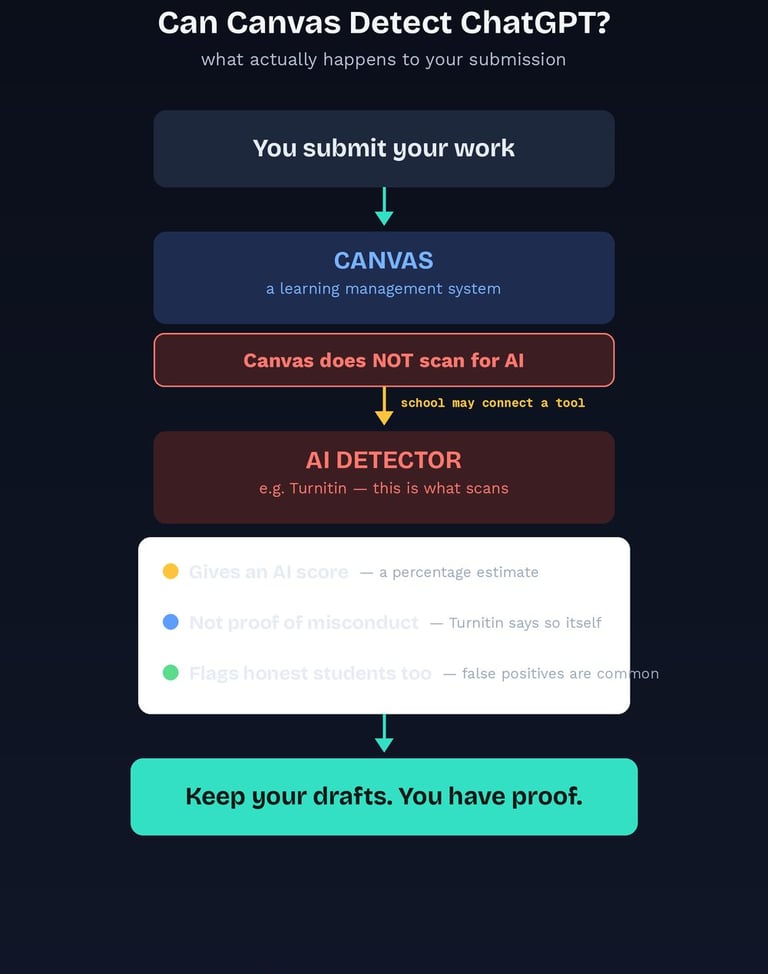
Quick answer: No. Canvas by itself cannot detect ChatGPT or any other AI writing. Canvas is a learning management system, a place to submit and grade work, not an AI detector. It has no built-in feature that scans your text and flags it as AI-generated. However, many schools connect third-party tools like Turnitin to Canvas, and those tools do scan for AI. So the honest answer is that Canvas is not detecting anything, but something running through Canvas might be. Canvas can also log activity like submission times and quiz behavior, which is a separate thing from AI detection.
If you have searched this question, you are probably a bit anxious. Maybe you used ChatGPT to help brainstorm and now you are second-guessing it. Or maybe you wrote every word yourself and you are terrified of being wrongly accused, which happens more often than people admit.
Either way, you deserve a straight answer rather than a scare story. So here is what Canvas actually does, what it does not do, and what really matters.
What Canvas actually is
Canvas is a learning management system built by Instructure. Its job is to host courses, distribute assignments, collect submissions, run quizzes, and let instructors grade and give feedback. That is how Instructure's own product documentation describes it, and you will not find an AI detection feature listed anywhere in it.
That is it. Canvas is essentially the digital classroom and filing cabinet. It is not an analysis tool, and it was never built to judge whether your writing came from a human or a machine.
This matters because a lot of the panic online treats Canvas like some kind of surveillance system. It is not. Understanding what it actually is takes most of the fear out of the question.
So does Canvas have AI detection?
On its own, no. There is no native Canvas feature that reads your essay and decides it was written by ChatGPT. Canvas does not analyze your writing style, does not compare it against AI models, and does not produce an "AI score" by itself.
But here is the part that actually matters: many institutions integrate third-party tools into Canvas. The most common is Turnitin, which does have an AI writing indicator. When your school enables that integration, your submission goes through Canvas and gets scanned by Turnitin behind the scenes.
So when a student says "Canvas flagged my essay as AI," what really happened is that a detector connected to Canvas flagged it. The distinction sounds technical, but it changes what you should actually be thinking about. The question is not "can Canvas detect AI." The question is "has my school connected a detector to Canvas."
If you want to know whether Turnitin specifically can catch AI writing, I covered whether Turnitin can detect ChatGPT in detail, and how it compares to other tools in which AI detector is closest to Turnitin.
Canvas vs an AI detector: what each one actually does
The clearest way to understand this is to see the two side by side. They are not the same thing, and confusing them is the source of most of the panic.
Canvas (the learning management system):
Purpose: hosting courses, collecting submissions, running quizzes, grading
Scans your writing for AI? No
Produces an AI score? No
Can see: submission times, submission history, quiz activity logs, page views
Cannot see: your other browser tabs during a normal assignment, what tools you used to write
An AI detector (like Turnitin, connected to Canvas by your school):
Purpose: estimating how much of a document looks AI-generated
Scans your writing for AI? Yes, that is its entire job
Produces an AI score? Yes, as a percentage estimate
Can see: the text of your submission, and how closely its patterns resemble AI writing
Cannot see: whether you actually used AI. It infers from patterns, which is why it gets things wrong
The takeaway: Canvas is the delivery pipe. The detector is the scanner. If nobody plugged a scanner into the pipe, nothing is being scanned.
What Canvas can actually see
Canvas does not detect AI, but it is not blind either. It does log certain activity, and it is worth knowing what is and is not visible, because a lot of the rumors here are wrong.
Things Canvas genuinely records:
Submission timestamps. When you submitted, and whether it was late.
Submission history. If you resubmit, previous versions are typically kept.
Quiz activity logs. For quizzes, Canvas can log when you started, when you finished, and in some configurations whether you navigated away from the quiz window.
Page and content views. Instructors can often see whether you opened course materials.
Things Canvas does not do:
It does not watch your screen or see your other browser tabs during a normal assignment.
It does not know you had ChatGPT open in another window while writing an essay at home.
It does not read your keystrokes on a regular written submission.
It does not "detect copy and paste" in the way people fear. Pasting text into a Canvas submission box is not itself flagged as cheating, and Canvas does not report where the text came from.
One important exception: proctored or lockdown quiz environments are different. If your school uses a proctoring tool or lockdown browser, that software can monitor tab switching, screen activity, or your webcam. But that is the proctoring tool doing it, not Canvas, and you will normally know when one is in use.
The part nobody talks about: false positives
Here is where I want to be genuinely honest with you, because most articles on this topic skip it.
AI detectors regularly flag writing that a human actually wrote. This is a real, documented problem, not a rare glitch. Clear, well-structured, straightforward writing can score as AI-like, because that is what the detectors are pattern-matching against. Students who write plainly, students who write formally, and students writing in English as a second language all get caught in this more often.
And here is the crucial thing: an AI score is not proof. This is not my opinion, it is Turnitin's own position. In its published guidance on its AI writing detection feature, Turnitin states plainly that the AI indicator is not proof of misconduct and should not be used on its own to accuse a student. It is designed as a signal for an instructor to look more closely, and it explicitly requires human judgment and a conversation with the student.
That distinction is worth holding onto, because a percentage on a screen can feel like a verdict when it is really just an estimate.
So if you wrote your own work and got flagged, you are not necessarily in trouble, and you are certainly not the only one. I wrote a full breakdown of why AI detectors flag human writing, because understanding the mechanism takes a lot of the fear out of it.
What to do if you are wrongly flagged
If you genuinely wrote your work and a detector flagged it, do not panic and do not assume you have no defense. You usually have more evidence than you think.
Keep your drafts. Version history in Google Docs or Word is often the single strongest proof of authorship, because it shows the work being built over time.
Save your notes and research. Outlines, sources, and scribbled plans all demonstrate a real process.
Be ready to discuss your own work. If you wrote it, you can explain your argument, your choices, and your sources. Someone who did not write it usually cannot.
Ask what the score actually means. An AI percentage is an estimate, not evidence. It is fair to ask how it is being interpreted.
Stay calm and cooperative. Defensiveness reads badly. Confidence backed by evidence reads well.
I covered this in much more depth in how to prove you did not use AI, including exactly what evidence carries the most weight.
The best protection is boring but effective: write in a tool that keeps version history, and keep your drafts. Do that from the start, and a false accusation becomes something you can answer in minutes.
Using AI honestly, without risking anything
This is worth saying plainly, because the conversation online tends to collapse into "AI equals cheating," and that is not how most institutions actually see it.
Using AI to brainstorm ideas, explain a concept you are stuck on, or check your grammar is usually fine and is often explicitly allowed. Using it to write the assignment for you is not, and that is the line most academic integrity policies draw.
The genuinely safe path is simple: check your course policy, because it varies by institution and even by instructor. Then use AI as a tool that supports your own thinking rather than a replacement for it. Write the work yourself, keep your drafts, and you never have to worry about what any detector says.
Frequently Asked Questions
Can Canvas detect ChatGPT? No. Canvas by itself has no AI detection feature. It is a learning management system for submitting and grading work, not a detector. However, many schools connect third-party tools like Turnitin to Canvas, and those tools do scan for AI writing. So Canvas is not detecting anything, but something running through it might be.
Does Canvas have AI detection built in? No. Canvas has no native feature that analyzes your writing and flags it as AI-generated. Any AI detection you experience through Canvas comes from an integrated third-party tool, most commonly Turnitin, that your institution has chosen to enable.
Does Canvas detect AI without Turnitin? Not on its own. Without an integrated detection tool, Canvas has no ability to identify AI-written text. If your school has not connected a detector, submissions are not being scanned for AI, though instructors can still raise concerns based on their own judgment.
Can Canvas detect copy and paste? Canvas does not flag pasting as cheating, and it does not report where pasted text came from. Pasting your own work into a submission box is completely normal. Note that plagiarism tools integrated with Canvas can compare your text against existing sources, but that is source matching, not detection of the paste itself.
Can Canvas see my other browser tabs? Not during a normal assignment. Canvas cannot see what else you have open on your computer. The exception is proctored exams or lockdown browsers, where separate proctoring software can monitor tab switching and screen activity. That is the proctoring tool, not Canvas, and you will normally be told when one is in use.
Does Canvas detect AI in discussion posts? Canvas itself does not analyze discussion posts for AI, just as it does not analyze essays. If your institution has enabled an AI detection tool across submissions, it may scan discussion contributions depending on how the integration is configured. But Canvas on its own is simply storing and displaying what you wrote.
Can Canvas detect ChatGPT on multiple choice quizzes? Canvas cannot tell that an answer came from ChatGPT. What it can do on quizzes is log activity, such as when you started and finished, and in some setups whether you navigated away from the quiz window. That is behavioral logging, not AI detection. If your school uses a proctoring tool or lockdown browser, that separate software can monitor much more.
What if Canvas flags my essay as AI but I wrote it myself? False positives are a real and common problem. An AI score is an estimate, not proof of misconduct, and Turnitin itself says it should not be used alone to accuse a student. Keep your drafts and version history, save your notes and sources, and be ready to explain your own work, because those are the strongest forms of evidence that you wrote it yourself.
Final Word
Canvas is not watching you, and it is not secretly analyzing your writing. It is a submission and grading platform, nothing more.
What actually matters is whether your institution has connected an AI detector to it, and even then, a detection score is an estimate rather than a verdict. Honest students do get flagged, which is exactly why keeping your drafts and working in a tool with version history is such a simple and powerful protection.
Write your own work, keep the evidence of how you wrote it, and check your course's AI policy. Do that, and you have nothing to fear from Canvas or anything connected to it.
Contact
Subscribe our Newsletter
© 2026. All rights reserved.
about anumtechno
AnumTechno is a modern digital platform focused on AI, SEO, and content creation insights. The website helps creators, bloggers, and marketers learn how to use artificial intelligence to write better content, improve search rankings, and grow online traffic effectively. It shares practical guides, tutorials, and strategies designed to simplify complex SEO and AI concepts for beginners and professionals alike.